
Agents and skills
This page configures three linked concepts: agents, the directives that steer them turn by turn, and the named skills an agent can use from routines or supported invocation modes. The read-only product skills catalog still describes stable platform contracts. Use a personal token or service credential for eligible authoring routes; lifecycle settings and credential management use the signed-in dashboard session. See Personal tokens and service accounts.
Authoring and execution are different. Agent skills are created through the agent skill endpoints. Runtime still dispatches through the capability executor behind the named skill.
Draft revisions and private tests
Agent behavior is saved in a private draft. A successful directive, routine, context-variable, or agent-setting write advances the draft generation; it does not change the revision used by new visitor conversations. The dashboard then materializes one immutable candidate for that generation, lets you test it, and publishes it as a separate action.
The revision API is available to workspace bearer credentials with the matching agent permission:
GET  /api/v1/agents/{agentId}/revision-state
POST /api/v1/agents/{agentId}/revisions/candidates
GET  /api/v1/agents/{agentId}/revisions?include=published
GET  /api/v1/agents/{agentId}/revisions/{revisionId}
POST /api/v1/agents/{agentId}/revisions/{revisionId}/publish
POST .../publish requires the draft generation, the expected published
revision, and an idempotency key. A stale request returns 409 revision_conflict; an invalid candidate returns 422 revision_invalid.
Each successful publication receives the next per-agent version number (v1,
v2, and so on). Retrying the same publication command returns that same
version. Publishing changes one agent revision across its channels.
Conversations that are already running keep their starting revision; new
conversations use the published revision.
Private Test Chat selects a candidate or published revision and accepts sample values for the selected context variables. Test conversations and sample values stay operator-only. Test and eval evidence records the exact revision and inputs it used; changing the draft does not relabel earlier evidence. Selected eval cases can be run from Test Chat, and a failed side or case can be retried without replacing successful comparison evidence.
Use GET /api/v1/agents/{agentId}/test-executions?limit=50 to page through
private Test Chat history, then GET /api/v1/agents/{agentId}/test-executions/{executionId}
to reopen one execution with its frozen values, side transcripts, and retry
evidence. These endpoints require workspace.agents.manage and never add test
conversations to public or visitor history.
To continue a real conversation as a private test, start a single execution with
seedConversationId set to a conversation in the same workspace and agent. The
response is the execution with the side’s history already holding that
conversation’s user and assistant messages, and the side resumes the conversation’s
active routine, pending clarification, and directive state on its next turn. The
source conversation is never changed, a seeded execution skips the greeting, and
the request is rejected with 400 when mode is compare or with 404 when the
conversation belongs to another workspace or agent.
Agents
Each workspace has a default agent. Chat calls use that agent when agentId is omitted.
Agents own:
- display name and logo
- custom instructions
- suggested-question behavior on the default retrieve skill
- theme and greeting behavior
- source scope
- surface settings for authenticated chat, anonymous chat, and website embed
Retrieval answer configuration lives on the agent’s default-answer retrieve skill. Use the unified skill endpoints to update fields such as query rewrite behavior, reranking, metadata rules, strategy, source scope, suggested questions, and answer instruction for that one agent.
The read-only GET /api/v1/settings/retrieval-defaults endpoint returns those inherited retrieval defaults plus workspace metadata field suggestions for the Skills tab. It does not update retrieval behavior.
If an agent has retrievalEnabled: true, assistant chat may use retrieval and return citations. If retrievalEnabled: false, the agent answers through the direct assistant path and returns diagnostics with retrievalInvoked: false.
Directives
Directives add steering to matching turns. A directive has a condition, an
action, optional priority and relationship fields, and optional scope tags.
In the dashboard you author directives in the agent’s Directives settings, where your own rules sit above the built-in Radioso directives you can Override.
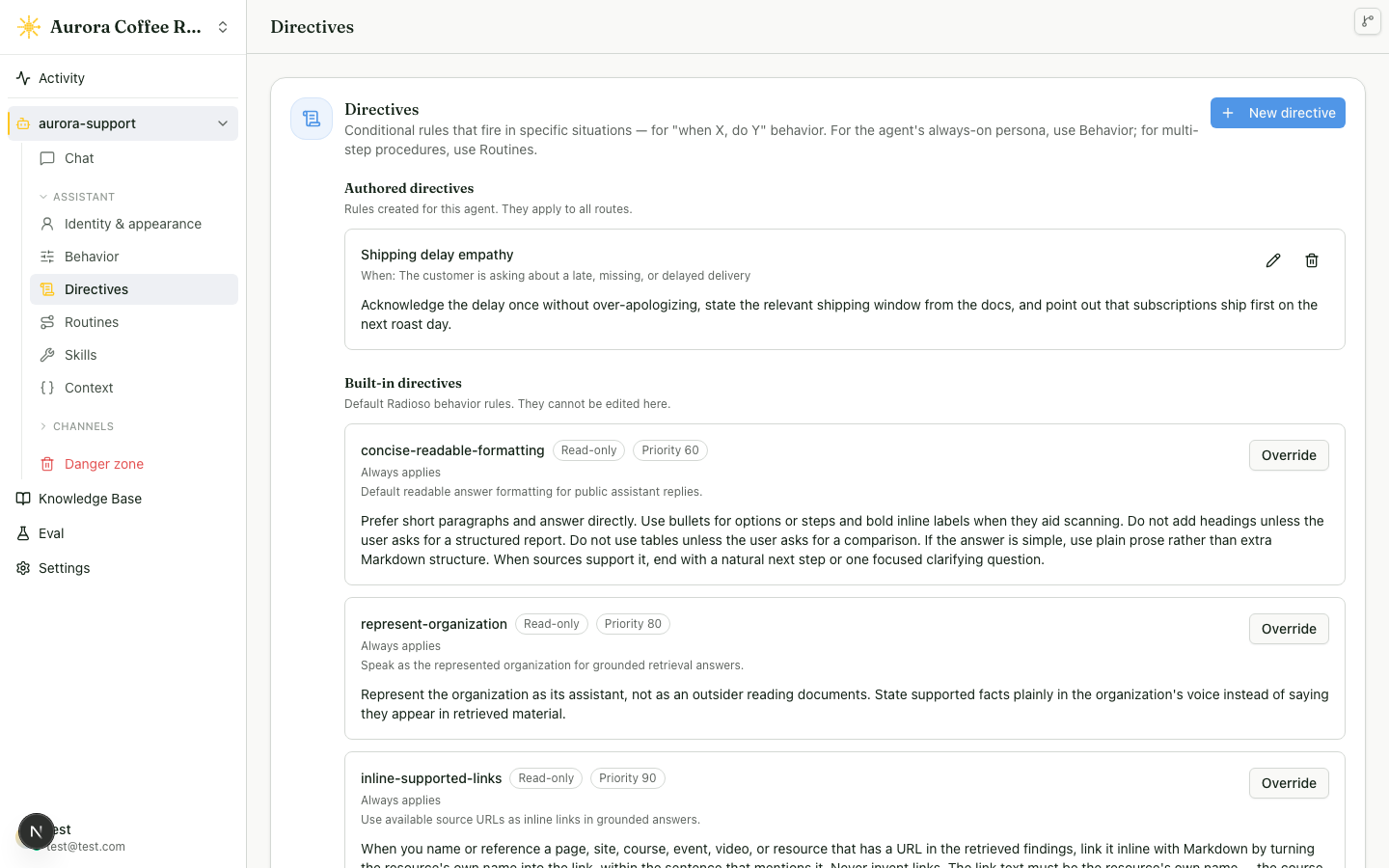
Create a directive with POST /api/v1/agents/{agentId}/directives:
{
  "name": "order-status",
  "condition": {
    "kind": "contextual",
    "description": "the visitor asks about an order status"
  },
  "action": "Look up the order before answering. Do not guess order state.",
  "priority": 80,
  "binding": {
    "kind": "skill",
    "skillName": "order_lookup"
  }
}
binding is optional and may be null. The only supported binding kind is
skill. The named skill must exist on the agent, be enabled, and use
agent_selectable invocation mode. External MCP skills (kind: external_mcp)
can claim the terminal turn and produce a user-facing chat reply. Retrieval
skills (kind: retrieve) are staged into the agentic retrieval loop as
directive-scoped lookup tools. Action-only skill kinds are rejected. Invalid
bindings return 400 and name the offending skill.
To change an existing directive, use PATCH /api/v1/agents/{agentId}/directives/{directiveId}.
Leave coverageCriteria out to keep its saved values, or send
"coverageCriteria": null to remove the answer-coverage condition. A non-null
criterion needs at least one coverage value; its optional reasons list is
omitted when it has no restrictions.
In the dashboard, the binding is a chip in the directive’s Instruction field:
type # to pick from the skills this agent can bind, and the chip you insert is
binding.skillName. The menu offers exactly the skills the API accepts, and a
directive holds one, so the menu explains itself instead of offering a second
while a chip is present. Deleting the chip clears the binding on save. A binding
whose skill is disabled or renamed keeps its chip and marks it as an unknown
skill, so the rule stays visible instead of disappearing.
The chip is the binding, and binding in the API is what decides which text is
a chip when the directive is opened again. Prose reads as prose: an action such
as Point the customer at #billing for pricing questions. on a directive with
no binding keeps those characters as words, and saving the directive leaves
binding at null — even when a bindable skill named billing exists.
Write the chip wherever the sentence needs it, including at the end:
Escalate using #issue_refund. binds issue_refund and keeps its period,
because a trailing . , ; : ! or ? belongs to the prose. Reopening
that directive shows the same chip and the same text, so a save that changes
only the priority sends the action back unchanged.
If you type a name the agent has no skill for, the menu offers
Create skill ”…”. That opens the same capability picker and configuration
form the Skills list uses, narrowed to the two capabilities a directive can bind
— MCP tool and Knowledge retrieval — with the name you typed already in
the form. Skill names are lowercase identifiers, so RefundLookup is saved as
refundlookup and the chip carries that. The skill is created enabled and
agent_selectable, which is what the binding requires. Cancel out of either
dialog and the field keeps your prose with no chip and no binding. MCP
connections are still set up in the MCP channel section: connecting and
authorizing a server is infrastructure, separate from authoring behavior over
it.
When a directive with an external MCP binding matches a non-routine turn, the turn selector routes to the bound skill if that skill is available as a runtime turn skill. When a directive with a retrieval binding matches, the answer loop receives a lookup tool for that skill. The directive action still steers the answer. A non-matching directive has no selection effect.
When multiple matched directives bind skills, one binding wins:
- higher priority
- higher matcher confidence, with deterministic
alwaysmatches treated as1.0 - directive name ascending
If a bound external MCP skill is later disabled, removed, no longer
turn-selectable, not registered at runtime, or blocked by the workspace
capability policy (external skills require the external_skills.invoke
capability), Radioso ignores the binding and falls through to normal selection.
The directive action still applies. The turn trace records selected, losing,
and skipped terminal bindings with their reasons. If a bound retrieval skill is
unavailable or blocked by the retrieval.answer capability, it is not staged as
an agentic lookup tool.
Agent config export/import preserves directive bindings by skill name. Import does not validate that the target agent currently has the skill: when the imported binding points at a skill the agent doesn’t have, the same fall-through rule above applies — Radioso ignores the binding and uses normal selection — right up until you add and enable a skill with that name.
Bindings on directives scoped with routine:<id> or
step:<routineId>:<stepId> are accepted but inert during routine turns, because
routine flow bypasses terminal turn selection.
Agent skills
GET /api/v1/agents/{agentId}/skill-capabilities returns the capability registry projection for the agent. Each capability includes its targets, whether it requires a target, input schema, outcomes, supported invocation modes, and availability.
GET /api/v1/agents/{agentId}/skills returns the agent’s named skills in one envelope:
namecapabilitytargetconfiginvocationModeenabled
Create skills with POST /api/v1/agents/{agentId}/skills. In the dashboard, Add new skill first opens a capability picker; enabled tiles then open the configuration form for that capability. The form shows only the skill name, enabled state, required target or tool fields, and essential capability settings by default. Invocation mode and advanced retrieval tuning live under Advanced. Input binding, outcomes, and advanced JSON live under Routine integration because they only matter when a routine or the agent selects the skill. The form and API use the same model for retrieve, mcp_tool, email, slack_post, webhook_call, and notify.
A mcp_tool skill (and the external_mcp directive binding below) is Radioso calling out to someone else’s MCP server as a tool. That’s the opposite direction from Radioso’s own MCP server, which a client like Cursor or Claude Desktop connects into.
Each row in the Skills list says which authored surfaces reach it — “Used by 2
directives and 1 routine”, or “Not used by a directive or routine”. A skill
nothing references never fires, and the count is the fastest way to spot one
after a rename or a deleted directive. The dashboard derives it from
GET /api/v1/agents/{agentId}/directives and
GET /api/v1/agents/{agentId}/routines; the skill envelope itself carries no
usage field. A routine counts once however many of its steps call the skill.
Update skills with PATCH /api/v1/agents/{agentId}/skills/{skillId}. Use config for a shallow merge into the existing skill config. Use replaceConfig when sending the complete config from an editor and omitted keys should be removed, such as clearing a retrieval override so the skill inherits the default again. Do not send both fields in the same request.
Retrieval skill settings
The retrieve capability descriptor includes field help, inherited defaults, and dependency hints. In the dashboard, an unset field shows the effective system default inline. Saving still stores only overrides. Clearing a field removes that key from the skill config so the agent inherits the system default again.
The main tuning fields are:
retrievalStrategy:fixedruns one search pass,reasoninglets the model plan and run multiple searches, andautolets Radioso choose per query.vectorTopK: how many chunks are fetched from the vector index before filtering and reranking.rerankEnabled: whether the fetched chunks are re-scored with the reranker model. Off by default because it adds a model call to every retrieval.rerankTopK: how many chunks survive reranking and are passed to the answer. It is relevant when reranking is enabled.queryRewriteEnabled: whether the user message is rewritten into search queries before retrieval.semanticRewriteInstructions: the instructions used to rewrite the user message into the semantic vector search query. A non-empty value replaces the default. The dashboard shows the default read-only until you choose Override, which copies it into the editor so you can adjust it. It is relevant when query rewrite is enabled.lexicalRewriteInstructions: the instructions used to rewrite the user message into the lexical keyword search query. It behaves the same way as the semantic instructions. It is relevant when query rewrite is enabled.suggestedQuestionsEnabled: whether the assistant offers follow-up question suggestions after each answer.suggestedQuestionsCount: how many follow-up questions to suggest. It is relevant when suggested questions are enabled.
Context variables
Context variables are workspace declarations that an agent may enable per agent. They are separate from skills. A skill is something the assistant can do; a context variable is data the turn may resolve and use.
The catalog endpoints create and update host-defined variable declarations:
namedescriptionvalueType:stringorjsontrustTier:unverifiedorsignedsensitivity:normalorsensitivedefaultSurfacing:always,on_reference, oroperator_only
The per-agent enablement endpoints choose how a catalog variable is wired for one agent:
source:pushedorresolversurfacing:always,on_reference, oroperator_onlyenabled
The dashboard exposes the pushed source. Resolver-backed variables
are part of the API contract; the operator UI does not configure them. A
resolver enablement also supplies resolverSkillId, which must name an enabled
skill on the same agent. Disabling that skill disables its resolver enablements;
re-enabling the skill does not opt those variables back in automatically.
Deleting the skill removes its resolver enablements.
Host backends push runtime values through
PUT /api/v1/context-variables/{id}/values. The request identifies the scope:
{
  "scope": { "type": "session", "id": "public-session-id" },
  "data": {
    "items": [{ "sku": "course-101", "quantity": 1 }]
  }
}
Values resolve from most specific to least specific scope:
session, customer, agent, then workspace. Use the narrowest scope that
matches the data. For example, a cart usually belongs to a session or customer;
a market-wide promotion may belong to an agent or workspace.
Contact requests
An agent can offer a “contact a human” option in chat. This is backed by a notify skill, commonly named contact_human. When the skill is enabled, the assistant can collect the visitor’s email and message, then deliver the request out of band.
notify is config-only. It does not bind to a connection target, so create it with target.kind set to notify_delivery and target.id set to null.
Configure delivery in the notify skill config:
recipientEmails: up to 5 email addresses. Each is emailed a copy of the request. When the list is empty, Radioso falls back to the workspace owner.webhook: an optional{ "url": "https://..." }. When set, Radioso also POSTs the request to that URL. Email and webhook both fire when both are configured.
An agent can have more than one notify skill — for example contact_sales and contact_support, each with its own delivery config. A routine step that calls a specific skill by name (#contact_sales) delivers through that skill’s own recipients and webhook. A routine step that reaches the chat-only contact flow without naming a skill, or names a skill that turns out to be disabled or missing, delivers through the contact_human skill when one is configured, then through the agent’s own delivery setting, then through the workspace owner.
Example notify skill config fragment:
{
  "delivery": {
    "recipientEmails": ["support@example.com", "ops@example.com"],
    "webhook": { "url": "https://example.com/hooks/contact" }
  },
  "exposedInputs": { "message": true, "email": true }
}
Webhook payload
The webhook receives a POST with a JSON body:
{
  "name": "Ada",
  "email": "ada@example.com",
  "message": "Please call me back.",
  "workspaceId": "...",
  "conversationId": "...",
  "requestId": "..."
}
There is no request signature. Treat the webhook URL itself as a secret: keep it private and use a hard-to-guess path so only Radioso knows where to post.
Each request carries an Idempotency-Key header. Delivery is at-least-once, so the same request may arrive more than once on retries. Use the key to de-duplicate.
Radioso sends the request with POST, follows redirects only to publicly routable hosts, and applies a short delivery timeout. Point the webhook at a stable public endpoint.
Handoff and approval notifications
Radioso also tells a person when a conversation needs one: a routine reaches a handoff, the agent hands off on a retrieval miss, or a routine step pauses for an approval decision. These notices resolve their destination the same way an unnamed contact request does — through the contact_human skill when one is configured, then the agent’s own delivery setting, then the workspace owner. A notify skill with another name, such as contact_sales, is not consulted, and turning contact_human off silences these notices along with contact requests.
Each notice is emailed to the resolved recipients and, when a webhook is configured, posted to it as JSON:
{
  "workspaceId": "...",
  "agentId": "...",
  "conversationId": "...",
  "reason": "routine_handoff",
  "routine": { "id": "...", "name": "Book accommodation" },
  "collected": {
    "program": "Yoga retreat",
    "arrival": "2026-10-12",
    "departure": "2026-10-16",
    "guest_name": "Alex Rivera",
    "guest_email": "alex@example.com"
  },
  "dashboardUrl": "https://app.radioso.ai/w/support-abc/activity?tab=all&filter=chat&itemKind=chat&itemId=...",
  "requestId": "..."
}
A handoff carries reason, either routine_handoff or retrieval_miss. routine names the routine whose hand-off ending raised the notice, with name set to null when the routine has since been deleted; it is null for a retrieval-miss handoff. collected holds the routine’s declared values keyed by slot key, in the order the routine declares them, and is empty for a retrieval-miss handoff. Text, number, and boolean values are included; a slot holding a structured value is left out. The email version of the notice lists the same values under a Collected: heading. An approval carries handle instead — the value you pass to POST /api/v1/agents/{agentId}/decisions/{handle}/resolve, described in Human takeover. That is how a receiver tells the two apart. dashboardUrl opens the conversation in the dashboard; it is null when the link cannot be resolved, for example because the workspace has since been deleted, so a receiver that needs a link should fall back to conversationId. The same Idempotency-Key and delivery rules as contact requests apply.
Move an agent between workspaces
In the dashboard, an agent’s Profile page carries Move this agent → Export bundle, which downloads the file. To bring one in, open Agents in the sidebar, choose New agent, then Import a bundle; the dialog shows what the file contains before it creates anything, and reports what needs your attention afterwards. The API below is the same pair of operations.
GET /api/v1/agents/{agentId}/bundle reads one agent — its configuration, routines, context-variable enablements, and named skills — into a single portable document. POST /api/v1/agents/bundle reads that document back and creates a new agent from it. Use the pair to back up an agent, promote one from a staging workspace into production, or hand a configured agent to a teammate’s workspace.
Export needs workspace.agents.read; import needs workspace.agents.manage, because it creates an agent.
curl -sS https://api.radioso.ai/api/v1/agents/<agent-id>/bundle \
  -H "Authorization: Bearer $RADIOSO_API_TOKEN" \
  -o support-agent-bundle.json
The bundle looks like this, trimmed:
{
  "bundleVersion": 1,
  "agent": { "schemaVersion": 4, "name": "Support", "customInstruction": "..." },
  "routines": [
    {
      "name": "refund-flow",
      "version": 3,
      "definition": {
        "name": "refund-flow",
        "enabled": true,
        "steps": [{ "stableStepId": "step_refund", "kind": "tool", "toolRef": "issue_refund", "...": "..." }],
        "...": "..."
      }
    }
  ],
  "contextVariables": [
    { "variableName": "cart", "source": "resolver", "resolverSkillName": "cart_lookup", "enabled": true }
  ],
  "agentSkills": [
    {
      "name": "cart_lookup",
      "capability": "mcp_tool",
      "invocationMode": "agent_selectable",
      "enabled": true,
      "config": {},
      "omittedConfigKeys": [],
      "target": { "kind": "mcp_connection", "id": { "__ref": "agentSkillTarget" } }
    }
  ]
}
routines carries the agent’s routines, each with its own enabled flag, so a routine parked out of service arrives parked rather than going live in the destination workspace. A routine names its own skills and context variables (toolRef, slot bindings) rather than a database id, so nothing in it needs remapping on import. contextVariables re-keys each enablement to variableName and resolverSkillName in place of the ids the source database used. agent.contactRequestDelivery is always redacted: its recipients and webhook URL stay in the source workspace, because an imported agent that kept them would quietly route contact requests to the original workspace’s people and endpoint. agentSkills carries only the config fields the skill’s capability marked portable — a webhook URL or delivery recipient stays home — and replaces target.id, the workspace connection the skill points at, with a { "__ref": "agentSkillTarget" } placeholder, because that connection is where the credential lives. Each skill also carries omittedConfigKeys: the names — never the values — of the settings that stayed behind, so import can tell you exactly what to re-enter.
Authored directives travel with the agent configuration, including any
coverageCriteria. Import preserves those values, so a directive conditioned on
an unanswered answer keeps the same condition in its destination workspace.
Move the file wherever you’re importing into — a different workspace, a different Radioso deployment — and post it:
curl -sS -X POST https://api.radioso.ai/api/v1/agents/bundle \
  -H "Authorization: Bearer $RADIOSO_API_TOKEN" \
  -H "Content-Type: application/json" \
  -d @support-agent-bundle.json
A successful import returns 201 with an importId, a new agentId, and an unresolved array. Read it before treating the agent as ready:
{
  "importId": "a6e21c3e-2f6a-4d1a-9e3c-8f1a2c9a11de",
  "agentId": "b6e21c3e-2f6a-4d1a-9e3c-8f1a2c9a11de",
  "replayed": false,
  "unresolved": [
    {
      "kind": "skill_target_unbound",
      "element": "skill:cart_lookup",
      "detail": "Bind \"cart_lookup\" to a mcp_connection in this workspace, then enable it."
    },
    {
      "kind": "context_variable_missing",
      "element": "contextVariable:cart",
      "detail": "No context variable named \"cart\" exists in this workspace. Create it, then enable it on the agent."
    }
  ]
}
For an automated retry, add an idempotencyKey to the posted bundle. The key is scoped to the destination workspace. Repeating a completed key returns 200 with that same importId, agentId, unresolved report, and replayed: true; a key that is still applying returns 409 with agent_bundle_import_in_progress. A failed or compensated attempt does not hold the key, so you can retry it as a fresh import.
Use the import id when an operator needs to inspect an attempt after the request:
curl -sS https://api.radioso.ai/api/v1/agents/bundle/imports/a6e21c3e-2f6a-4d1a-9e3c-8f1a2c9a11de \
  -H "Authorization: Bearer $RADIOSO_API_TOKEN"
The job state moves from queued to applying, then to applied, failed, or compensated. compensated means the worker removed an agent left behind by an interrupted import; the response keeps the original agent id so support can correlate the cleanup. Set AGENT_BUNDLE_IMPORT_ORPHAN_AGE_MS to control how old an active job must be before that worker sweep runs. The default is 15 minutes. Imports normally take seconds: if an import exceeds that age, cleanup fences the request, the request returns a retryable 409, and the cleanup owns deleting its agent.
Each kind names one thing to go fix, and where:
skill_target_unbound: the skill’s connection — a webhook, an MCP server, a mailbox — holds a credential and stayed in the source workspace. Point the skill at a connection here, then enable it.skill_capability_unknown: the bundle names a capability this deployment doesn’t register. The skill wasn’t created, so anything that called it stays unbound.context_variable_missing: no context variable with this name exists in the destination workspace. Create it, then re-enable the enablement on the agent.resolver_skill_missing: the enablement’s resolver skill isn’t on the imported agent — often because that skill itself hitskill_capability_unknown. Re-enable the variable once the skill exists.routine_invalid: the routine could not be written into the destination workspace. A completion export pointing at a webhook destination that only exists in the source workspace is the usual cause. Thedetailnames the reason; create what it names, then add the routine through the routine endpoints.document_source_unresolved: the source agent answered from a specific set of documents. Document ids don’t carry across workspaces, so the imported agent starts with no sources selected — pick its sources under Knowledge.surface_credential_unbound: a chat surface (public chat link, website embed) was on, but its access token stayed in the source workspace. The surface imports off; turn it on to mint a new token.mcp_connection_unbound: an external MCP connection, or a skill built on one. Reconnect the server under External skills, re-entering its credential.asset_not_portable: the agent’s logo lives in object storage, not in the bundle. Re-upload it.contact_delivery_unbound: contact requests are on, but the recipient list and webhook stayed in the source workspace — an imported agent must never deliver to another workspace’s people. Set a destination under the agent’s contact settings.directive_binding_unbound: the directive is bound to a skill that did not come across, so it imports switched off rather than being dropped. Rebind it to a skill here, then enable it.skill_config_not_portable: the source agent set skill settings whose values stay in their own workspace — a delivery webhook URL, a recipient list, a document-source scope. Thedetailnames the exact settings; re-enter them on the imported skill. Where those settings are all a skill has, the skill itself is reported rather than created, and thedetailsays so — create it here and fill in its settings.
Every one of these is a safety default, and the pattern is the same throughout: import never grants an agent more access than you explicitly restore. A skill without its connection imports disabled, not live and broken. A surface without its token imports off, not serving on a token it never had. A source scope that named documents imports with none selected, not defaulted to every document in the new workspace.
Import reads the bundle from the request body, which is capped at 1 MB like every other Radioso API request. An agent with a very large number of routines can exceed that; split the move by importing the agent first and adding the remaining routines through the routine endpoints.
Both bundleVersion and the bundle’s agent.schemaVersion are checked against what this deployment reads, and the accepted versions are declared rather than inferred: an older agent.schemaVersion is accepted only while every field it predates defaults to the behaviour that version had. A bundle on a version this deployment does not read is rejected with 400 rather than partially applied.
Both routes record an audit event — agent.bundle.exported, agent.bundle.imported — with the agent id and the routine, skill, context-variable, and unresolved-reference counts, never the bundle’s contents: a bundle carries the agent’s custom instruction and every directive’s action text.
Read-only skills catalog
The skills catalog is read-only. It helps API, SDK, and assistant clients understand what work is available and which stable contract owns it.
For example, retrieval.answer points to the retrieval answer API. It does not require callers to switch to a generic POST /skills/{name}/execute contract.
Skill entries include:
- name and description
- optional display metadata, such as a UI title or icon hint
- availability
- contract references
- required capabilities
- diagnostic fields exposed by the implementation
- skill-owned outcomes, each mapped to a normalized status such as
completedorfailed
Endpoint reference
Agent, directive, skill, and context-variable bodies are documented field by field in the API Reference.
GET    /api/v1/agents
POST   /api/v1/agents
GET    /api/v1/agents/{agentId}
PUT    /api/v1/agents/{agentId}
GET    /api/v1/agents/{agentId}/assistant-logo
POST   /api/v1/agents/{agentId}/assistant-logo
DELETE /api/v1/agents/{agentId}/assistant-logo
POST   /api/v1/agents/{agentId}/default
GET    /api/v1/agents/{agentId}/bundle
POST   /api/v1/agents/bundle
GET    /api/v1/agents/bundle/imports/{importId}
GET    /api/v1/agents/{agentId}/skill-capabilities
GET    /api/v1/agents/{agentId}/directives
POST   /api/v1/agents/{agentId}/directives
POST   /api/v1/agents/{agentId}/directives/draft
PATCH  /api/v1/agents/{agentId}/directives/{directiveId}
DELETE /api/v1/agents/{agentId}/directives/{directiveId}
GET    /api/v1/agents/{agentId}/skills
POST   /api/v1/agents/{agentId}/skills
PATCH  /api/v1/agents/{agentId}/skills/{skillId}
DELETE /api/v1/agents/{agentId}/skills/{skillId}
GET    /api/v1/context-variables
POST   /api/v1/context-variables
GET    /api/v1/context-variables/{id}
PATCH  /api/v1/context-variables/{id}
DELETE /api/v1/context-variables/{id}
GET    /api/v1/agents/{agentId}/context-variables
PUT    /api/v1/agents/{agentId}/context-variables/{variableId}
DELETE /api/v1/agents/{agentId}/context-variables/{variableId}
GET    /api/v1/context-variables/{id}/values
PUT    /api/v1/context-variables/{id}/values
DELETE /api/v1/context-variables/{id}/values
GET    /api/v1/skills
GET    /api/v1/skills/{skillName}
Common failure modes
400on agent create or update usually means a field failed validation.401means the personal or service credential is missing, invalid, expired, or outside the route’s accepted credential scope.404means the agent or skill name does not exist in the current workspace context.- A skill can be listed even when the work is executed through another route. Use
contractReferencesto find the stable execution path. 400on a bundle import usually means an unsupportedbundleVersionoragent.schemaVersion— re-export the agent from a deployment this one reads.409withagent_bundle_import_in_progressmeans another request with the same idempotency key is still applying. Query itsimportIdor retry after it reaches a terminal state.